
Dev servers by name, not PID
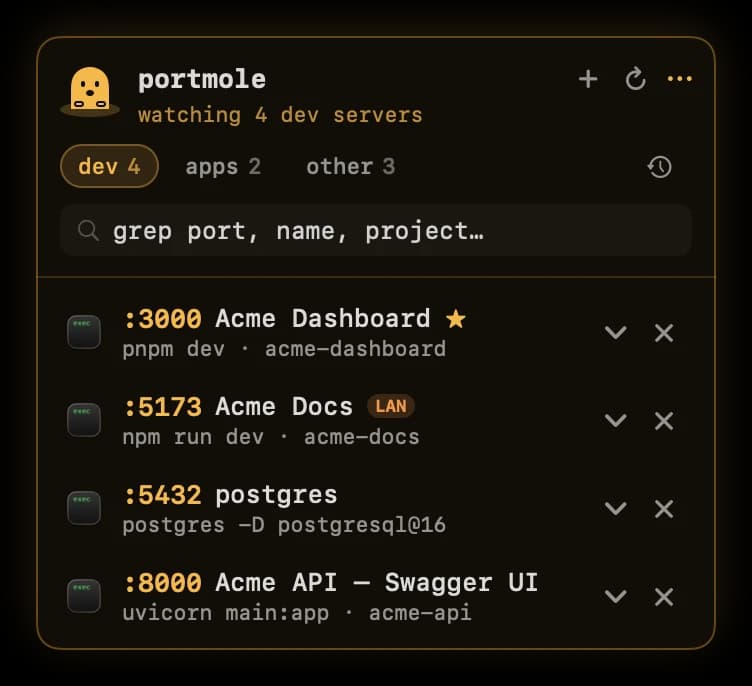
Each server shows its page <title>, the command that started it (npm run dev, even when node is the listener) and its project folder.
- port
- :3000
- title
- Acme Dashboard
- command
- pnpm dev
- folder
- ~/Code/acme-dashboard
 menu bar utility for macOS
A tiny menu bar app that shows every process listening on a port on your Mac, by page title, start command and project folder, and closes it in one click.
By downloading you agree to the Terms and Privacy Policy.
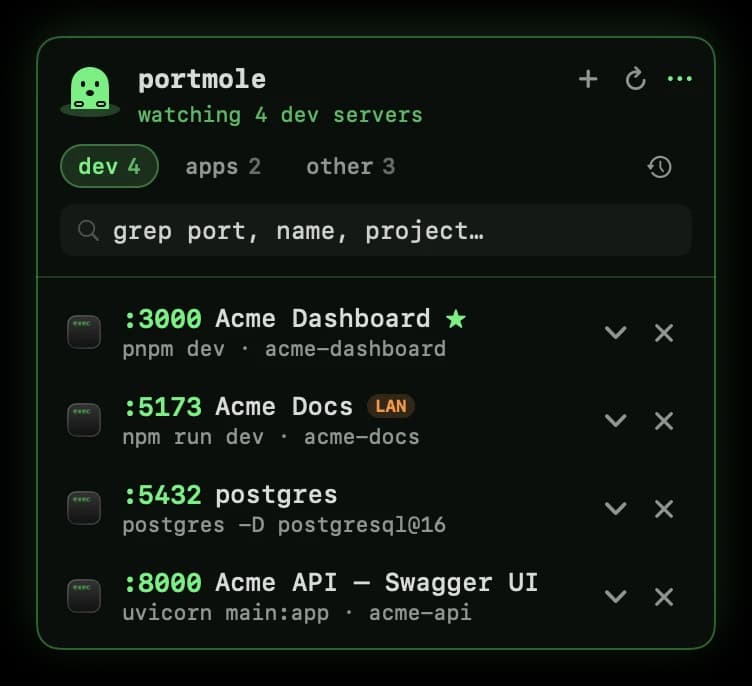
// the problem
Yesterday's dev server is still holding the port, or a crashed watcher never let go. Instead of digging through lsof output for a PID, open Portmole, find :3000, click ✕. Done, and free.
You see exactly what you're stopping first: the page title, the command that started it and the project folder. If it won't quit, Force Quit is one more click.
$ pnpm dev
> next dev

Error: listen EADDRINUSE: address already in use :::3000// free, forever
The free download shows you what's listening on your Mac, named the way you think about it, and stops it in one click.
Each server shows its page <title>, the command that started it (npm run dev, even when node is the listener) and its project folder.
Dev is the default view, so emulators and helper daemons stay out of your way. Everything else is one tab over.
✕ sends a polite SIGTERM. If one hangs on, Portmole offers Force Quit. In a hurry? ⌥-click to force it.
Filter by port, name or project as you type.
Click any dev server to open it in your browser, or Reveal in Finder to jump straight to its project.
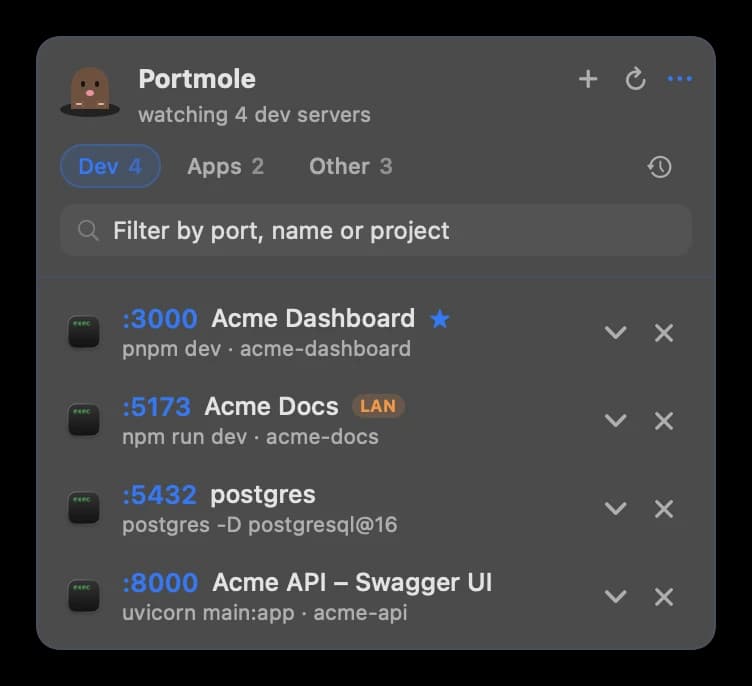
Open it from the menu bar, or from a small mole tab on the edge of your screen: drag it anywhere, click to open, right-click for options. The Terminal theme comes free.
It blinks, hops when servers start or stop, and ducks into its hole when one goes away. Try hovering here.
// portmole PRO
$15 once, for up to 3 Macs, with lifetime updates. No subscription. Projects run in a real Terminal window, so your logs stay visible and Ctrl‑C still works.
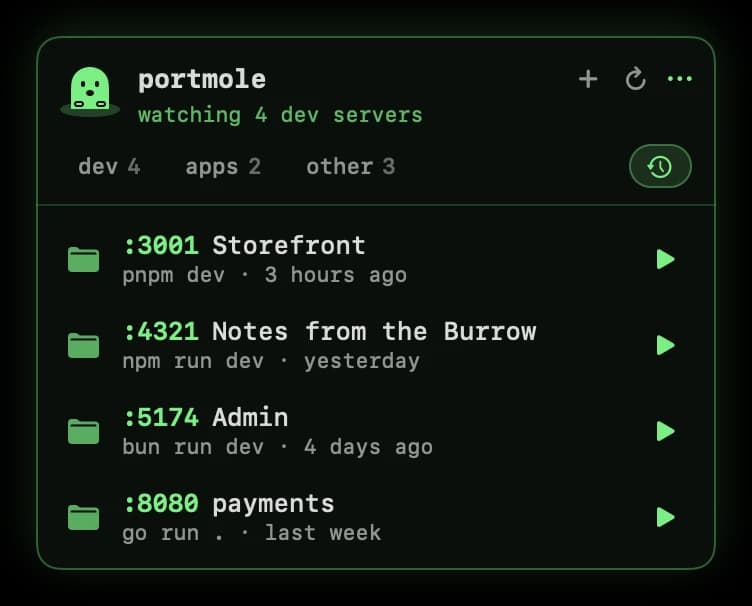
Every dev server you've run, one click from starting again. If its old port is taken, Portmole offers the next free one.
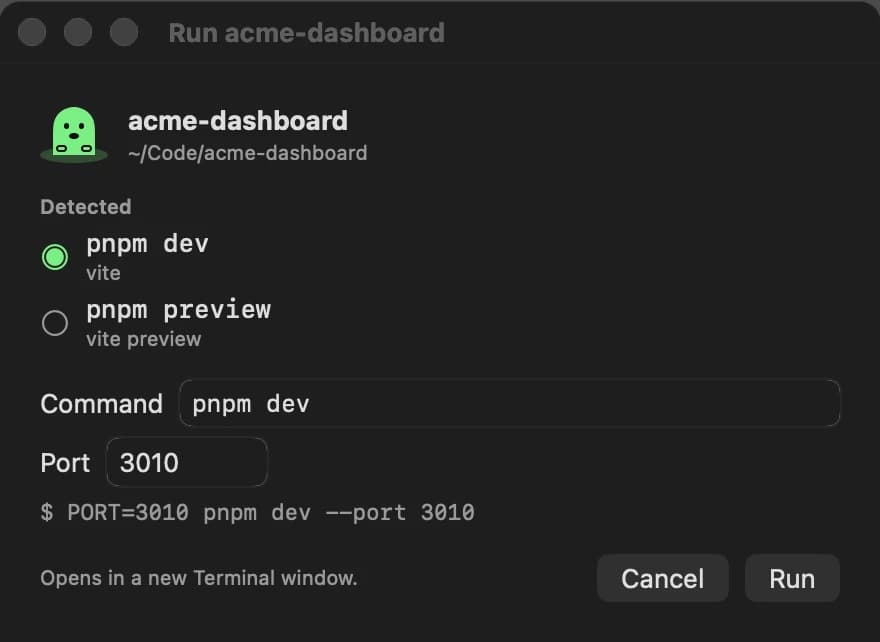
Pick any folder and Portmole works out how to run it, using the right package manager and installing dependencies if needed.
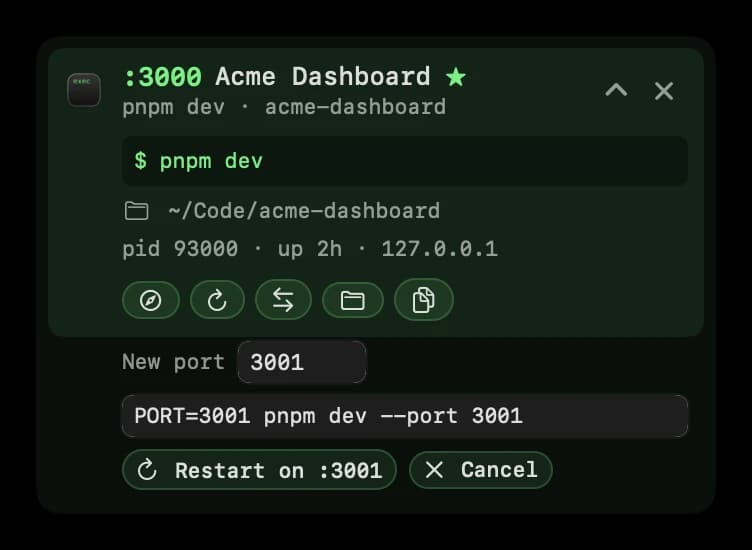
Move a server to another port. Portmole rewrites the start command for the framework (--port for Vite, Next and Astro, PORT= for Express), shows it for review, and restarts there.
// pricing
No subscription, no account. Lifetime updates on up to 3 Macs, and a 14-day refund if it's not for you.
| Feature | Free$0 | Pro$15 one-time |
|---|---|---|
| Every listening port in your menu bar, sorted into Dev / Apps / Other | ||
| Dev servers by page title, start command and project folder | ||
| Click to open in the browser, and search | ||
| Close ports in one click (SIGTERM, Force Quit, ⌥-click) | ||
| Reveal in Finder | ||
| Draggable screen-edge mole tab (or the menu bar) | ||
| The animated mole and the Terminal theme | ||
| Restart in Terminal and copy the start command | ||
| Recent: start any past dev server again | ||
| Open a project: pick a folder, the run command is detected | ||
| Change port: rewrite the command and restart there | ||
| Stars and the LAN badge | ||
| Dev-server count in the menu bar | ||
| Amber, Ice and macOS themes | ||
| Macs | Any | Up to 3 |
| Updates | Automatic | Lifetime |
| Download | Get Pro |
Payments are handled by Dodo Payments. 14-day refund policy.
// how it works
No analytics, no tracking. Portmole only talks to your own localhost servers (to read page titles), the license service when you activate Pro, and a once-a-day update check you can turn off in Settings. Privacy policy.
No admin password, no Accessibility or Full Disk Access prompts. Projects start in a real Terminal window you can watch and Ctrl‑C.
Signed and notarized by Apple, with built-in automatic updates (checked daily, optional). What's new.
About 7 MB. Runs natively on Apple silicon and Intel, on macOS 14 Sonoma or later.
Sandboxed apps can't see or stop other apps' processes, which is the whole point of Portmole. So it ships directly from techynAR.
Download the DMG and drag Portmole to Applications. It appears in your menu bar right away.
// faq
Something else? Email aryan@techynar.com.
Run kill $(lsof -t -iTCP:3000 -sTCP:LISTEN) in Terminal: lsof finds the process listening on port 3000 and kill asks it to quit with SIGTERM. Portmole does the same in one click, for free: open it from the menu bar or the mole tab on the edge of your screen, find :3000 (shown with its page title, start command and project folder) and click ✕. If the process hangs, Portmole offers Force Quit, and ⌥-click forces it straight away.
Run lsof -nP -iTCP -sTCP:LISTEN in Terminal to list every process listening on a TCP port, with its name, PID and port. Portmole does this for free and keeps the list live in your menu bar: sorted into Dev, Apps and Other, searchable, and with dev servers labelled by page title, start command and project folder.
EADDRINUSE means “address already in use”: your server tried to listen on a port that another process already holds, usually an old dev server that never shut down. Stop whatever is on that port (with kill $(lsof -t -iTCP:3000 -sTCP:LISTEN), or one click on ✕ in Portmole, which is free) or start your server on a different port.
On recent versions of macOS, ports 5000 and 7000 are taken by AirPlay Receiver, which runs inside the ControlCenter process. To free them, turn off AirPlay Receiver in System Settings → General → AirDrop & Handoff, or run your app on another port. Portmole shows which process holds any port, so you can check before changing anything.
Free: every listening port in your menu bar, sorted into Dev, Apps and Other; dev servers shown by page title, start command and project folder; click to open in your browser; search; close ports in one click (✕ sends SIGTERM, Force Quit if one hangs on, ⌥-click to force); Reveal in Finder; a draggable mole tab on the screen edge (or use the menu bar); the animated mole; and the Terminal theme. Portmole Pro is a $15 one-time purchase for up to 3 Macs with lifetime updates. It adds Restart in Terminal, copy the start command, Recent (start servers again), Open a project (pick a folder and Portmole detects how to run it), Change port, stars, the LAN badge, the dev-server count in the menu bar, and the Amber, Ice and macOS themes.
Yes. Email aryan@techynar.com within 14 days of purchase and you’ll get a full refund. The license key is deactivated when the refund is processed.
Yes, it’s safe, and no, it doesn’t need admin rights or any extra macOS permissions. Portmole is signed and notarized by Apple and has no telemetry or analytics. It only connects to your own localhost servers (to read page titles), to Dodo Payments’ license service when you activate Pro, and to a once-a-day update check that you can turn off in Settings.
Because Mac App Store apps must be sandboxed, and sandboxed apps can’t see or stop other apps’ processes, which is Portmole’s whole job. Download it directly instead: it’s signed and notarized by Apple and keeps itself up to date with built-in automatic updates (a daily check you can turn off in Settings).
Yes. Portmole is a universal app for Apple silicon and Intel Macs, and it needs macOS 14 Sonoma or later. It’s about 7 MB.
// also by techynAR
 ClepBoard High-precision text sanitizer removing invisible unicode, homoglyphs, and format noise.
 FastCanvas Client-side canvas editor for fast image adjustments with zero cloud uploads.
 macPrompter Dual-workspace teleprompter and scriptwriting studio for smooth on-camera delivery.
 Chant Circuit Distraction-free offline audio player with automatic Do Not Disturb.
By downloading you agree to the Terms and Privacy Policy.